RSS feed hacks
25 Mar
00
min read


Keep your digital signage fresh with real-time updates using RSS feeds. Explore useful feeds to add to your screens and learn how to set them up in Fusion Signage.
Digital signage isn't just about promoting your business – it's also a powerful way to keep people informed. Whether you're spreading the word about a cause or sharing important safety updates – digital signage is like your personal public relations officer. How exactly can you do this? By using RSS feeds.
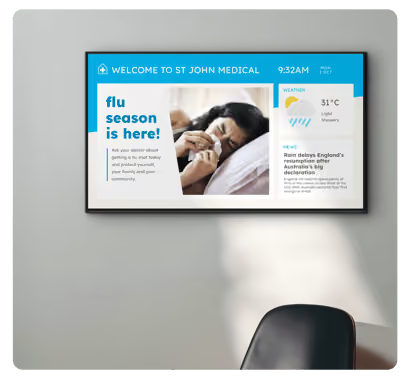
An RSS feed is like a magic link that supplies real-time updates to wherever the feed is embedded (in this case, your Fusion Signage content design). You can choose from a wide range of websites that will push information straight to your screen (in-very-real-time).
And generally speaking, it will be some headline posts and a brief summary of each. Picture it as automatic information delivery service. Showcasing headlines and summaries on your digital signage (along with your other content).
RSS feeds grab attention, keep viewers engaged, and leaves a lasting impression on your audience. It’s a small thing – but people remember when they learn something.
Here are some top-notch RSS feed URLs to get your digital sign pumping out meaningful, dynamic content.
(Insert table)
.avif)
How to
To add an RSS feed into your screen’s design, follow these step-by-step instructions:
- Login to your Fusion Signage account. (Don’t have an account? Try it for free here.)
- Click ‘Design’
- Either create a design from scratch, or edit one of your previous designs you’d like to add an RSS feed to.
- Click ‘Dynamic Widget’
- Click ‘rss-feed’
- At the top of the design screen, there will be an automatic RSS feed saying ‘https://www.abc.net.au/news/feed/51120/rss.xml’ – click that and another window will pop-up.
- Delete the autofilled URL and replace it with your chosen RSS feed URL.
- Click ‘Apply Changes’ and save!
If you have any issues, don’t hesitate (even for one second!) to contact us here. We’re always here to help you. 💙
New to Fusion Signage?
The Monthly Sip
Sign up to our newsletter for the latest updates, insights and helpful tips straight to your inbox.
Email*

Looking for something else?
We can’t wait to hear about it. Reach out to our sunshiney support or binge demos on-demand.
.avif)

Become a
Fusion Signage
partner

Our story
We’re an agile team of engineers, dog-lovers and get-stuff-done-ers. Here to make your digital signage feel simple, go powerful and create impact.

<3
Our sunshiney support have an average response time of less than three minutes. <3 that for us.
